

Basic intro to Frangular (FR)
What is Frangular
NO, you can’t Google it
Fleet team made up the name.
As far as I can tell it is made up of:
iFRame (which sits on the old UI) AND
Angular , the new UI language
If you want to read some background thoughts: Frangular - OLD Learning (Rather don’t 😄)
Currently this is still quite the process.
This process will become much simpler once our DEV environment has all the necessary sub-domains.
This will mean that we no longer need to run all the individual repos locally in order to test everything.
We will be using STM-1074 as an example of how to add a simple form within the new Frangular UI (FR-UI).
Jira: [STM-1074] Video event configuration - Jira (atlassian.net)
Moving parts
There are a few components to working with Frangular.
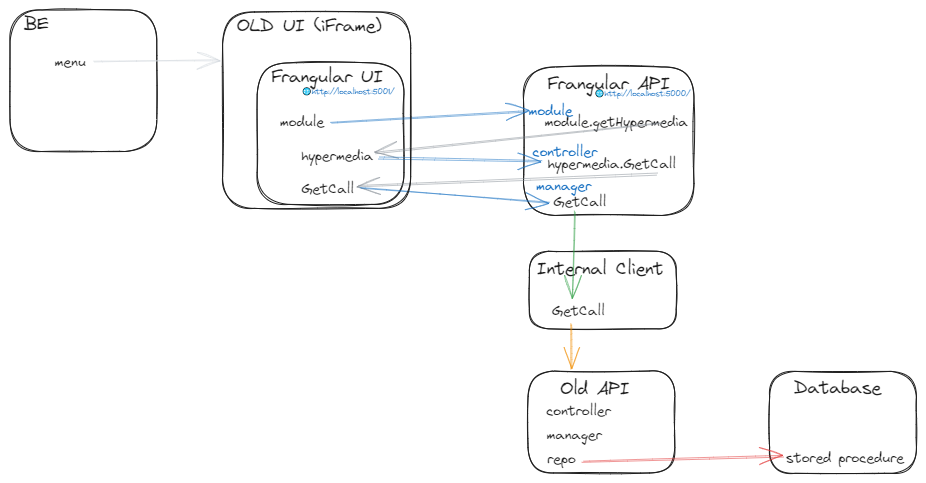
Usually:
- REPO (eg. DB stored proc)
- API (Our old API which will call this)
- Internal Client (which adds a method to call the old API)
- Frangular API (the new FR-API which will use the Internal Client to call the method)
- Frangular UI (the new FR-UI runs seperate from our old UI and is pulled in via an iFrame on a new page in the OLD UI)
- OLD UI (where we add a page with an iFrame which pulls in the FR-UI component)
- OLD BE (usually has something like a menu item, which the UI will use to open the new UI Page with the iFrame)
Most of these are straight forward.
The main things to learns would be:
- FR-API (which is very similar to the old API, document to follow below)
- FR-UI (this can get a bit more tricky, document to follow below)
- UI (just adding a page with an iFrame and a way to get there, eg. menu item or action menu)
You are ready: Getting your SEED app up and going
The new Frangular (FR) work has two main components.
The FR-UI and
the FR-API
Please follow these documents to get going on each (FR-API is the simplest)
I sent the main documentation to get going to Cornel and then to Pallavi.
They both got going with minimal effort.
Well done to them and it gives me hope that the documents to follow will help you.
AWS SAML
Ensure that you have download and installed saml2aws.
This needs to be done before running the code.
Here are the steps: AWS Login for SDK access
FR-UI
In this section - there is a link to the ReadMe which will give you a step by step guide.
This is also available as a seperate pdf
Please Note
When we implemented lazy loading columns for the grid, we added the kendo indicator control.
If you have issues, you will need to run one of the below commands within your terminal
ng add @progress/kendo-angular-indicators
//OR
npm install --save @progress/kendo-angular-indicators
FR-API
Herewith the API - it is more straight forward
Is is also available as a seperate pdf
Lets make a new Page
We have looked into a case study of Pallavi’s before.
I will now add an example for the new Frangular page.
New Frangular Page
Helpful Code Snippets
- Menu items: Frangular Show and Hide Menu items
- Kendo controls help: Angular Data Grid
- Sending and receiving INFO between the OLD and the NEW UI pages: Frangular Messaging OLD UI to FR-UI
- Toaster Notifications: Frangular Notifications
- Spinners: Frangular Spinner
- Errors: Frangular Error Messages
- Languaging:
- Grid:
- Styles: Update MiXTel Styles
Pipeline and Deployment (WIP)
Currently we have pipelines
We are however still deciding on the deployment
IF we decide to do the minified lambda version, we can look at the following:
Deploying to AWS - using the HOS team’s idea (WIP)
This was mentioned in the section above while talking to the HOS team.
Zonika is busy working on the steps to:
-
Build
-
Deploy
To AWS -
Add more things Zonika learned here
Frangular Build and Deploy thanks to Zonika
Conclusion
Once the whole flow can be tested and is in place, it is safe to say that everything is working.
This process will become much simpler once our DEV environment has all the necessary sub-domains.
This will mean that we no longer need to run all the individual repos locally in order to test everything.
A Case Study
EG: STM-1074 Example (FR-UI setup and adding components)
The main document to get going was mentioned above, first look at those, then this will explain how to add new components (pages).
Shuan will usually build the UI and CSS (wireframe) (as a component) in the SEED app.
We then make our own component in our FR-UI app.
After this we will pull the CSS and HTML from Shuan’s work into our component (this sometimes takes a while and shows some error. I will add more documentation below)
Once the static CSS and HTML is working for this component, we will start with the logic, actual data and binding it to the html.
As mentioned before, we will need a lot of moving parts.
Once all the moving parts are in place (DB, API, Client, FR-API, FR-UI, UI, BE), we start integration work and testing.
Get the static wireframe into our code
FR-UI Component (static)
STM-1074 Moving Shuans html to our component
How I got the wireframe to our component
STM-1074 More in-depth Steps to pull Shawn’s wireframe in
STM-1074 Example (FR-API and other logic)
Add OLD API Logic
We will need the route, controller, manager and repo logic here.
It will use some repo (DB Stored Proc or other) to get or set data.
It will be used by the Interna; Client Method
Add the Intermal Client method
It will use the OLD API to get information
It will be used by FR-API
Registering the method in the Internal Client to use in FR-API
Add the FR-API logic
It will use the Internal Client to make calls to our old API
It will be used by FR-UI to get data, etc
Questions regarding the above work done
STM-1074 Questions regarding the above work done